"Listening to Music takes 3 clicks and just a few seconds Wired headphones never run out of battery and have superior audio quality ..."
This item is the reason I am leaving the iphone and trying an unlocked/stock android device.
My music collection is a directory tree that I have curated and organized since 1996.
The correct way to deal with this is to move this directory tree onto my phone (either via network transfer or attaching a USB filesystem) and then browse those files with a music player app.
Anyone familiar with iDevices knows that every piece of the simple, standard workflow I just described is totally impossible.
Instead, you have to manually build playlists inside of itunes while "importing" your music (and storing two copies of it) and then transfer those playlists (one by one) to the idevice and ... it's just insane.
It is a workflow built for people that impulse buy a track here and there ...
> The correct way to deal with this is to move this directory tree onto my phone (either via network transfer or attaching a USB filesystem) and then browse those files with a music player app. Anyone familiar with iDevices knows that every piece of the simple, standard workflow I just described is totally impossible.
On the contrary, any number of apps support precisely this.
Having ripped some 20,000 CD tracks a couple decades ago, I use several such apps.
As a user of such apps, I'd argue with "correct" though, given Apple Match with iCloud One combo and last year's update supporting high resolution / lossless.
Over time, I have come to use those apps less than Apple Match, which mirrors my rips using tracks from Apple's library where they have them, or uploads mine where they don't, giving me more seamless access across all devices, spoken access from Siri on HomePods, etc. Match was a debacle at launch, is now almost never wrong on even the most obscure tracks.
It supports FLAC obviously but also Opus. For my phone, I've ripped my FLAC files to Opus and can carry my entire music collection wherever I go. I used their import tool to build the same folder structure that I have on my NAS. I have iTunes installed on my Windows machine (no Macs at home) but I try to avoid it if at all possible.
This app uploads your identifiers and activity to the developer without consent.
There's a growing trend these days of making every single player app into spyware, and it's sad. I won't use reader apps or player apps that read or play local files that are going to transmit my activity off device for no reason that benefits me.
Sure, I'd say I was also commenting on the idea that "Files and Folders" as anything other than an extremely obvious default (and even perhaps requires help on a forum) is again, terrible and silly.
> Instead, you have to manually build playlists inside of itunes while "importing" your music (and storing two copies of it) and then transfer those playlists (one by one) to the idevice and ... it's just insane.
This is not completely true. You can store your iTunes collection wherever you like, organized however you like. You don't have to duplicate anything, although it's true that the default is for it to "import" it.
You can also create an "all my music" playlist which you can sync with the iDevice.
I used to have this setup with my music collection on Google Drive (because it didn't fit on my MBP's internal drive) and synced some of it to my iPhone. It worked well enough. The issue was more that all the music couldn't fit on the phone, so I had to pick and choose anyway.
The real gotcha is that iTunes didn't support flac, so I had to convert everything to m4a.
"You can also create an "all my music" playlist which you can sync with the iDevice."
Yes, but then how do you deal with that enormous "all my music" playlist once it is in the iDevice ?
You can't browse by directory. You can't organize or display based on filename. So I guess I could parse all of the collection and transpose the artist/title/album out of the filename into mp3 metadata and then I would have a ... 30,000 track playlist ?
Again, all of this makes perfect sense if you're impulse buying a track here and a track there and if there is some way to move that "collection" to a new device every 2-3 years.
Well, I don't know how you organize your music "by directory", so maybe you can't reproduce what you do.
In my case, I organize it by artist / album / track number - track title; or by compilations. I then search for the album or the artist. I never have just random single tracks, so a directory is an album, which I have in Apple Music.
But I guess that you can't have any kind of organization you want, which is something that folders could give you.
> So I guess I could parse all of the collection and transpose the artist/title/album out of the filename into mp3 metadata and then I would have a ... 30,000 track playlist ?
Well, in the case of a meticulously managed collection, I'd expect the files to have correct metadata. Again, if this isn't the case, and you rely on file name / location, yeah, you're gonna have a bad time.
Just for the record, I've never bought any track off iTunes. All my music is ripped from CDs.
"Well, in the case of a meticulously managed collection, I'd expect the files to have correct metadata."
WAV files don't have metadata like mp3 files (typically) do.
I'm not saying I copy the uncompressed wav collection to my phone (~700 GB) but I am saying that my original metadata schema has all of the metadata in the filename:
Last, First - AlbumName - 01 - SongName - 3m25s.mp3
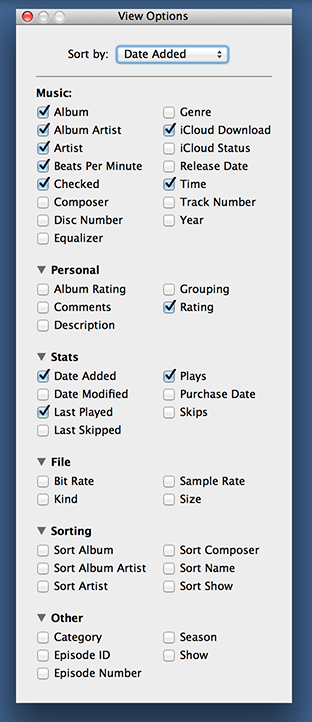
... and yes I could parse and reencode all of these populating their mp3 tags with these fields but, man ... what a load of work just because iTunes can sort by 50 different attributes just not filename:
> WAV files don't have metadata like mp3 files (typically) do.
I feel it's my civic duty here to repeat: they do, in fact they even support ID3 tags, but it's up to the software developer as to whether they support them or not.
WAV tagging has grown in support in the past few years, but yeah, iTunes certainly doesn't support them.
The old iTunes Media Library .xml format isn't too complicated - I wrote a few small tools to generate m3u8 playlists, and another to convert .m3u8 playlists into itunes library xml. Then I just import that straight into the music app.
Shouldn't take more than an afternoon of a reasonably proficient developer's time. I agree that it's not great that you should need to do this kind of thing, but it's less effort than switching to android ;)
> Anyone familiar with iDevices knows that every piece of the simple, standard workflow I just described is totally impossible.
I believe VOX Music Player allows you to upload your music without using iTunes - although it is using their cloud sync instead. Flacbox also seems to let you download and play local files from Dropbox, OneDrive, Box, SMB servers, DLNA servers, ...
My music collection is a giant pile of files (~19k tracks, according to iTunes) that I have been curating for a similar length of time, but I let iTunes do all the grind of organizing them on disc for me. My purchasing and listening is pretty much entirely on an album basis.
iTunes uploads it to Apple's cloud, since I'm paying for iTunes Match; my iPhone and iPads pull it down. It is very easy to search for a single album on the iOS players; they also make it very easy to find your most recent acquisitions, with an automatically-populated "Recently Added" playlist.
~/Music/iTunes/iTunes Media/Music looks almost exactly like the directory structure you're probably meticulously maintaining by hand (lots of Artist Name/Album Name/01 Track Name.m4a), but adding new stuff to it is a simple matter of dropping a directory full of properly-tagged files onto iTunes. Then I delete the original files after iTunes has copied it into its directory.
It breaks down if 90% of your collection is a bunch of badly-tagged files you downloaded off of KazAa, but if your collection is a mix of stuff you ripped from CDs back in the nineties and made sure were tagged properly, and stuff you've bought that the musician/store tagged properly, it works pretty much seamlessly. Except for this one weird glitch where sometimes iTunes on my Mac decides that I have both the copy of a track I bought off of the Apple store, and one in the cloud, and thus plays every song off an album twice. I've kinda quit buying stuff from Apple because of this; I'll go to Bandcamp first.
What is the attraction of meticulously maintaining a directory structure that a computer can very, very easily maintain based on the metadata stored in the files? Why are you so married to explicitly browsing a duplicate of this filesystem on other player devices?
When you drop all of your stuff into itunes, won't it automatically reencode everything to either aac, possibly leading to perceivable audio errors or to alc, bloating the file sizes to a ridiculous degree?
> Anyone familiar with iDevices knows that every piece of the simple, standard workflow I just described is totally impossible.
It is so bad that it makes me wonder who at Apple thought any of it was a good idea. Its not even 'bad from a certain perspective' bad but totally FUBAR.
I simply stopped trying to use my phone for playing music and it is the #1 reason why my partner wants to move away from iOS
Uh, did something change? As recently as a year ago I just dragged files into iTunes (or Music or whatever they call it now, but this was definitely after the split) then selected which artists I wanted to sync, and I only had to do that step because I didn't want them all on there. I didn't have to do anything with playlists.
But then, my metadata's in pretty good shape, so it barely even matters how my music files are stored. One big flat directory, carefully named folders, not that important.
To be fair, I guess I did have to convert the Flac to m4a. Drag to converter program, convert a ton in one go, drag those into iTunes. So that's one more step.
I think that manually organizing your own files is not really compatible with a large music library (I have around 2 TB of music) and, from my experience, was too much of a barrier for most people anyway. I currently use Swinsian to organize files (and various metadata-fixing tools) and Plex + Plexamp to listen to them. Mac mini server, iPhone. Works great. This is just to say that one person's "correct" is another person's cumbersome and unintuitive.
Using a file system as a metadata storage system is pretty dumb - especially when music files have ID3 tags built into their formats. There are tools that will help you fill out the metadata in the tags based on your file system layout. Once you do that you can use the tags to slice/dice. Smart Playlists are very powerful.
Or you can use one of the many other apps others linked to if you really want to stick to the whole filesystem thing.
I quickly got away from trying to organize stuff in the file system when I got my Personal Jukebox 100 (PJB100) - literally the first hard drive based MP3 player out there in the mid 90's. It heavily relied on MP3 tags so I developed tag discipline early on - and never looked back. Tags are WAY more flexible than folder structures. I couldn't care less how files are stored in the file system.
This conversation always amuses me - we don't complain the computer tracks all the parts of our files in a directory while we have no control over the layout of the files on disk - mainly because that's a level of minutiae better left to automation. For me it's a similar things with my music files. As long as my tag information is accurate (and since it's the first thing I do when I add something to my collection, it is) I can manage my music collection however I want irrespective of where the file is.


This item is the reason I am leaving the iphone and trying an unlocked/stock android device.
My music collection is a directory tree that I have curated and organized since 1996.
The correct way to deal with this is to move this directory tree onto my phone (either via network transfer or attaching a USB filesystem) and then browse those files with a music player app.
Anyone familiar with iDevices knows that every piece of the simple, standard workflow I just described is totally impossible.
Instead, you have to manually build playlists inside of itunes while "importing" your music (and storing two copies of it) and then transfer those playlists (one by one) to the idevice and ... it's just insane.
It is a workflow built for people that impulse buy a track here and there ...